
Results 1 to 10 of 10

Thread: How do I reduce the number of my pics on this web site?????

Hybrid View

Previous Post Previous Post   Next Post Next Post
  1. #1
    Senior Hostboard Member atilsley's Avatar
    Join Date
    February 15th, 2010
    Location
    Sydney
    Posts
    196
    Follows
    0
    Following
    0
    Mentioned
    0 Post(s)
    Tagged
    0 Thread(s)
    Quoted
    1 Post(s)

    How do I reduce the number of my pics on this web site?????

    With a limited number of pics the site wil accept....how do I find my history to delete them...? (quite annoying)

    Other web site resize the pics to small sizes...very clever...can we do that here, or increase the data storage?

    Thanks

  2. #2
    Senior Hostboard Member dbale's Avatar
    Join Date
    December 14th, 2007
    Posts
    140
    Follows
    0
    Following
    0
    Mentioned
    0 Post(s)
    Tagged
    0 Thread(s)
    Quoted
    0 Post(s)

    Re: How do I reduce the number of my pics on this web site??

    Settings > Miscellaneous > Attachments

  3. #3
    Senior Hostboard Member Audio_by_Goodwill's Avatar
    Join Date
    November 9th, 2004
    Location
    West Michigan
    Posts
    2,157
    Follows
    0
    Following
    0
    Mentioned
    0 Post(s)
    Tagged
    0 Thread(s)
    Quoted
    0 Post(s)

    Re: How do I reduce the number of my pics on this web site??

    It would be better to use an outside picture hosting service, like photobucket, so threads with pictures wouldn't loose there meaning when the pictures disappear.
    Audio_by_Goodwill
    Michigan, USA

  4. #4
    Senior Hostboard Member
    How do I reduce the number of my pics on this web site?????


    Old Guy's Avatar
    Join Date
    June 23rd, 2003
    Posts
    6,359
    Follows
    0
    Following
    0
    Mentioned
    2 Post(s)
    Tagged
    0 Thread(s)
    Quoted
    62 Post(s)

    Re: How do I reduce the number of my pics on this web site??

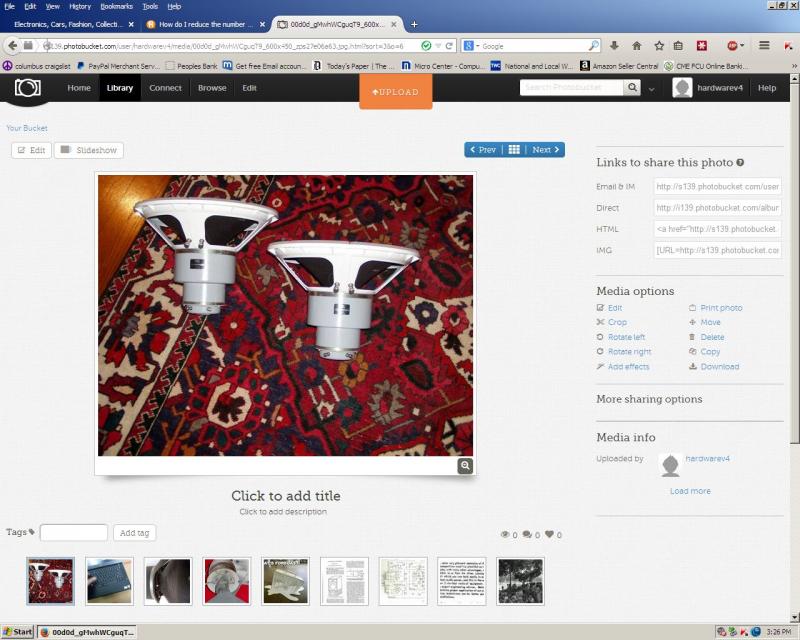
    Photobucket is the answer. The site shows squashed versions. Upload pix to photobucket. Then over to the right you will see ways to link. Click on img code, it will say copied. Then just paste that into your post. Voila- full size pic, as many as you want

    Like this
    6

    13
    Your neighbors called. They like your music.

  5. #5
    Senior Hostboard Member atilsley's Avatar
    Join Date
    February 15th, 2010
    Location
    Sydney
    Posts
    196
    Follows
    0
    Following
    0
    Mentioned
    0 Post(s)
    Tagged
    0 Thread(s)
    Quoted
    1 Post(s)

    Re: How do I reduce the number of my pics on this web site??

    Thanks guys...I'm using photobucker more now.

    Regards.

  6. #6
    Senior Hostboard Member GM's Avatar
    Join Date
    December 26th, 2002
    Location
    Chamblee, Ga.
    Posts
    4,967
    Follows
    0
    Following
    0
    Mentioned
    3 Post(s)
    Tagged
    0 Thread(s)
    Quoted
    48 Post(s)

    Re: How do I reduce the number of my pics on this web site??

    I go to Photobucket and all the 'garbage' pretty much locks up my computer presumably thanks to 'customer no service' AT&T DSL and why I use Flickr.

    GM
    Loud is Beautiful if it's Clean! As always though, the usual disclaimers apply to this post's contents.

  7. #7
    HB Super Moderator
    How do I reduce the number of my pics on this web site?????


    Altec Best's Avatar
    Join Date
    June 10th, 2008
    Location
    Central New Jersey
    Posts
    4,257
    Follows
    0
    Following
    0
    Mentioned
    0 Post(s)
    Tagged
    0 Thread(s)
    Quoted
    16 Post(s)

    Re: How do I reduce the number of my pics on this web site??

    Any photo hosting site will suffice..Photobucket,Flickr,Picasso,Image Shack,etc... Also agree with ABG on removing photos from your account as it will hurt the older threads they are posted in..Why I have always advocated the use of outside photo hosting sites to post your photos here.Besides Hostboards image resizer reduces your photos to practically thumbnail proportions..

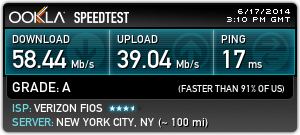
    Also agree with OG on the 50 MB connection..Makes a world of difference.My Kaspersky AV also has a thing built in that blocks all those banner ads which helps as well.
    2
    Last edited by Altec Best; June 17th, 2014 at 11:23 AM.

Posting Permissions

  • You may not post new threads
  • You may not post replies
  • You may not post attachments
  • You may not edit your posts
  •  
This forum has been viewed: 28100561 times.